

AI-powered onboarding for one of Indian Banking’s most complex account types.
DCB CUBE 2.0 AI Platform
Role

Lead Requirements Gatherer · UX/UI Designer · Principal Front-End Developer
Company

Atirath Technologies × DCB Bank
Tools

Figma
FigJam
Figma Make
React
POC: 2.5 months · BRD signed: May 2026 · Releases through Sept 2026
DCB Bank Website

The Context
Opening a Trust account is one of the most complex onboarding journeys in Indian banking — layered across multiple Trust Acts, with dozens of document and KYC checks that change from case to case.
01
Relationship Managers with no prior trust experience were expected to open these accounts correctly.
02
A single executive stakeholder oversees 600–700 trust-account openings a day, nationwide.
03
Every account meant manually navigating regulation, gathering the right documents, and verifying each one’s validity.
04
The outcome: a slow, error-prone, expert-dependent process that simply did not scale.
The brief: prove that an LLM-driven chatbot could guide any RM through the entire journey — accurately, and without a specialist in the loop.
From Proof of Concept to Product
Proof of concept — Trust account journey
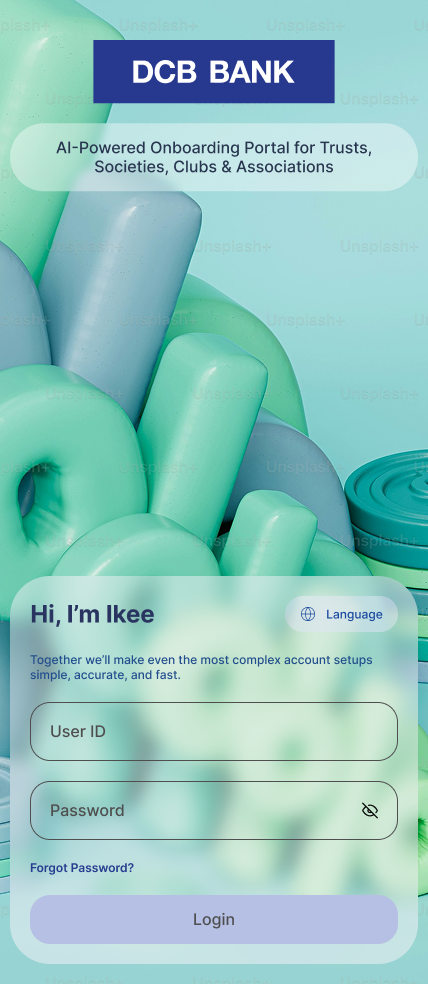
Ikee — RM sign-in
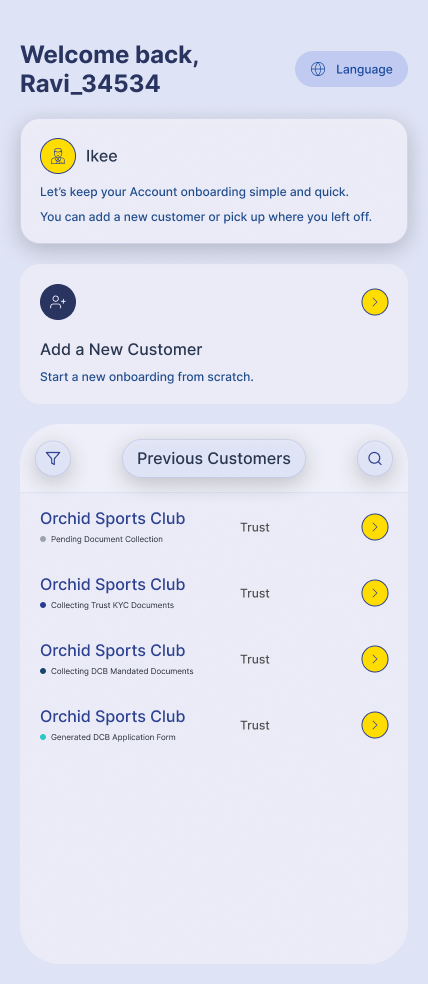
Customer dashboard
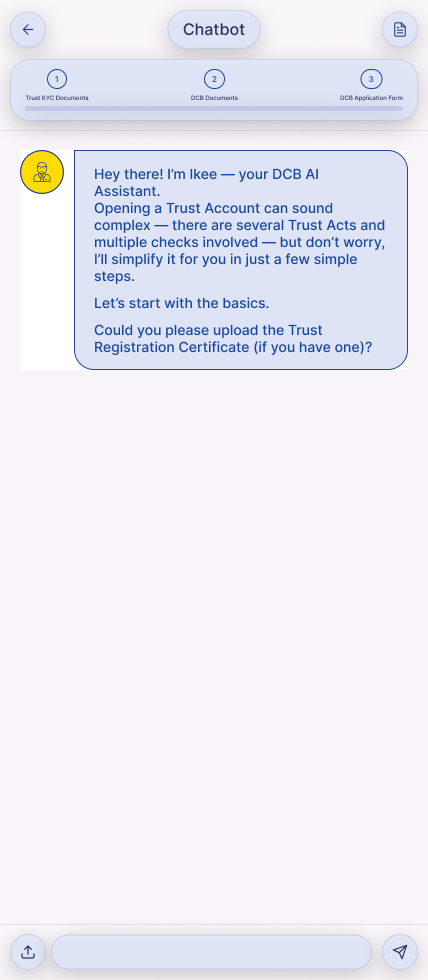
Ikee chatbot — guided journey
Official products — currently in development
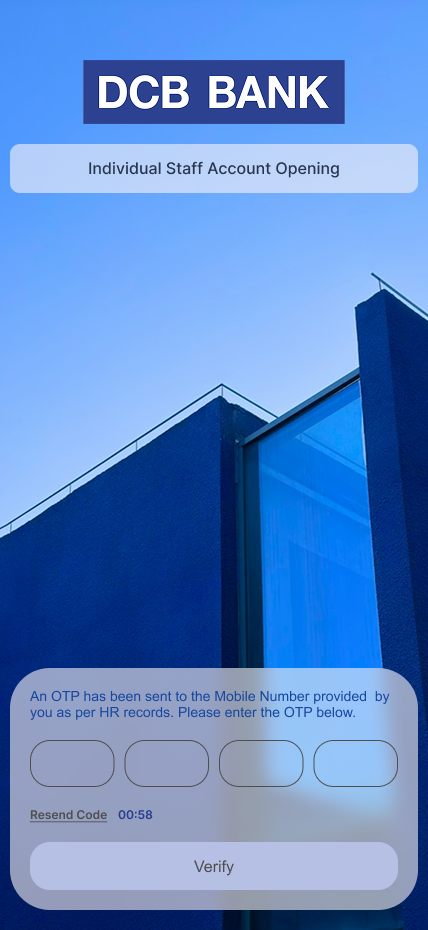
Staff account — OTP verification
Obscured — design in active development and not yet public.
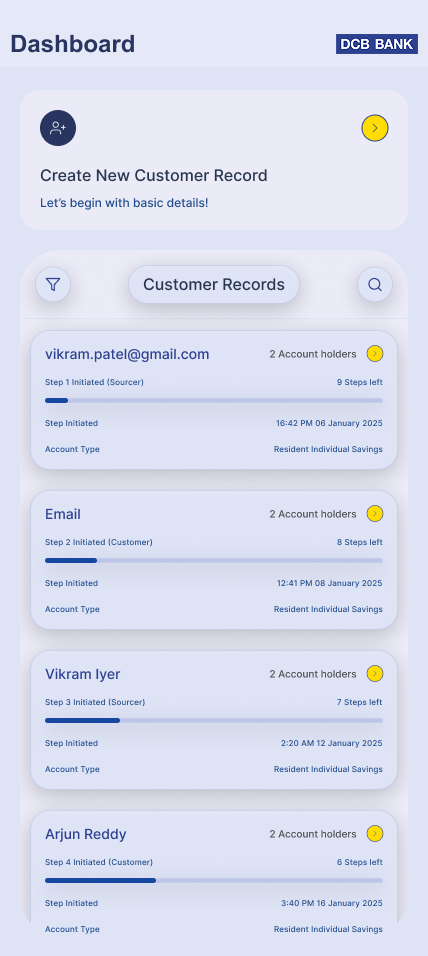
Customer records dashboard
Obscured — design in active development and not yet public.
Project Overview
CUBE 2.0 is an AI-powered onboarding platform built for DCB Bank. At its centre is Ikee, a conversational assistant that lets any relationship manager open complex accounts through a simple chat — not forms — while the system handles the heavy lifting behind the scenes.
What CUBE 2.0 does
Opens accounts through a guided conversation instead of dense forms.
Walks any RM through each step in plain language — no specialist required.
Reads and checks documents as they are collected, flagging what is missing or invalid.
Produces the bank’s completed application paperwork at the end of the journey.
What I own
Requirements — the single point of contact with DCB’s executive stakeholders.
UX / UI — every screen and the full chatbot interaction model.
Front-end — shipping the production UI, accelerated by code-gen automation.
Scope — the platform behind DCB’s first wave of AI onboarding products.
The Challenges
Four problems had to be solved at once for the concept to be credible to a bank.

Regulation overload
Multiple Trust Acts and case-by-case rules that no single RM could be expected to know.

Inexperienced operators
The product had to make a first-timer perform like a trust specialist.

Document validity
Every document had to be the correct one — and actually valid — before submission.

Built for scale
The journey had to hold up across roughly 70,000 customers nationwide.
Design Goals
01
Make complexity invisible
Hide the regulatory machinery and surface only the next simple step the RM needs to take.
02
Guide, never gate
Ikee leads the way and explains as it goes — it never blocks the RM with jargon or dead ends.
03
Status you can trust at a glance
Always show where the account stands and whether each document is valid, pending, or rejected.
04
True to the DCB brand
Every screen built to the DCB brand book — navy, yellow, Arial — so it feels unmistakably like the bank.
05
Paper-free by default
The entire journey runs end to end digitally, with zero physical forms.
One Platform, Many Account Types
CUBE 2.0 is built so the same conversational experience can open very different account types. The Trust journey proved the model; the platform is now being extended across DCB’s onboarding suite — each new account type plugging into the same intelligent core.
Chat-first onboarding
Smart document handling
Live validity status
Auto-generated paperwork
Ready for new account types
Products I’m Leading
The first three account types under the signed BRD — each one mine end to end across requirements, design, and front-end.
01
Individual Staff Account
Fast, guided onboarding for the bank’s own staff members.
Requirements
UX/UI
Front-End
02
Individual Savings Account
Resident individual savings onboarding, designed for everyday scale.
Requirements
UX/UI
Front-End
03
Proprietorship Account
Non-individual onboarding tailored to sole proprietors.
Requirements
UX/UI
Front-End
The Logic Engine
Before a single screen was designed, I mapped the entire trust-account decision logic — every branch, document gate, and validation path the assistant would follow. This map became the framework the LLM engine and the chatbot UI were both built on.
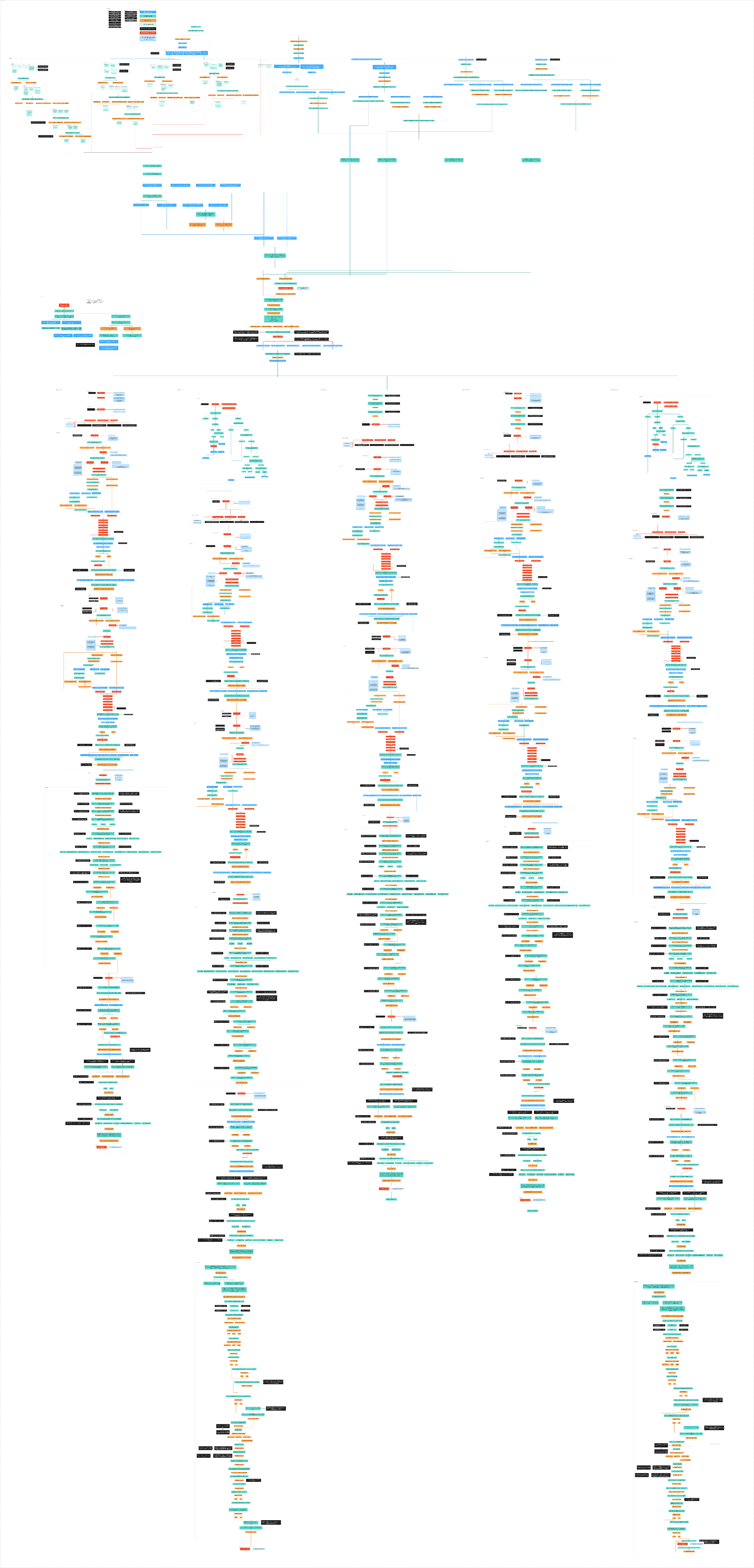
The full decision map at scale — too dense to read at a glance, which is exactly the point: it is the rigor the product is built on.
Obscured — design in active development and not yet public.
Architecture I Helped Shape
Owning the requirements end to end earned me a seat at the architecture table. After the BRD was signed, I helped draft the platform’s logical architecture — shown here only as a backdrop, kept deliberately illegible.
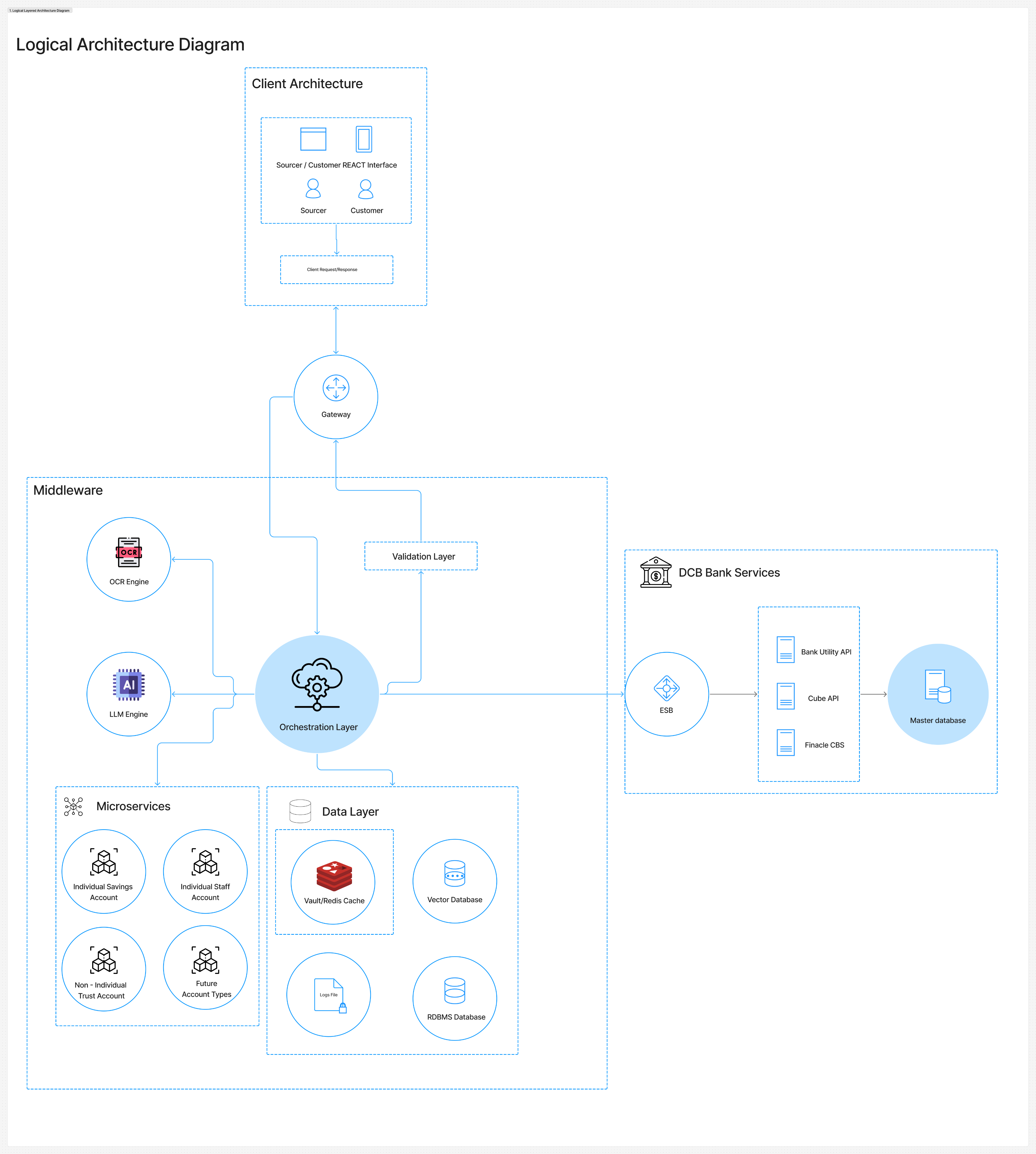
Obscured — design in active development and not yet public.
Visual Design System
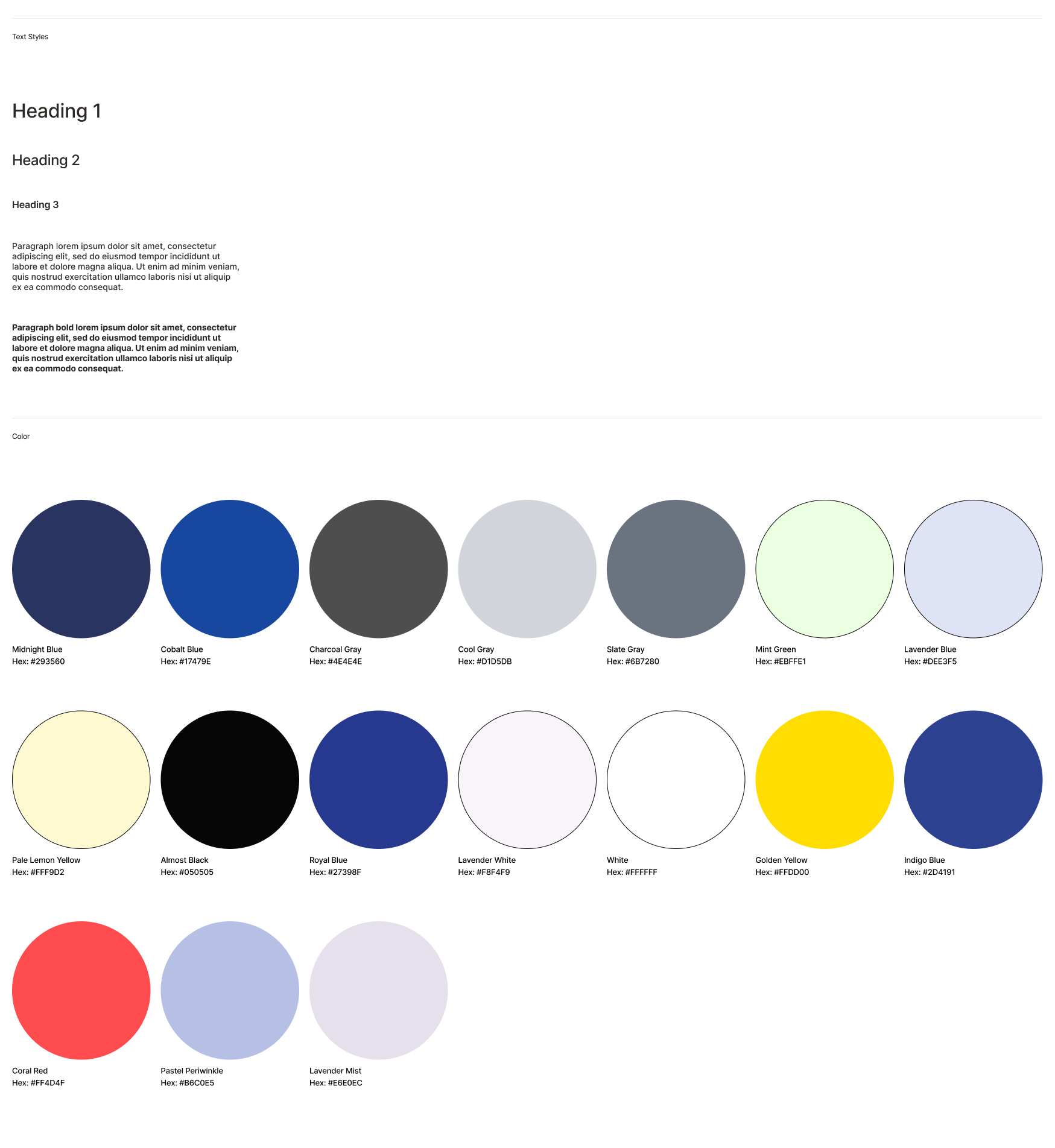
Every surface is built to the DCB Bank brand book, so the product feels unmistakably like the bank from the first screen.
Colour
DCB Blue — #17479E
The bank’s primary navy. Anchors headers, structure, and brand presence.
DCB Yellow — #FFDD00
The signature accent. Reserved for action, focus, and highlights.
Neutral Grey — #6D6E71
Quiet supporting tone for body text, labels, and dividers.
Type
Arial is the DCB brand typeface — bold for headlines, regular for body, and narrow for fine print — used consistently across every product screen.
Design system
Obscured — design in active development and not yet public.
Mobile-first
Designed for the RM’s phone, where onboarding actually happens.
Clear hierarchy
One primary action per screen keeps an inexperienced RM on track.
Consistent system
Shared components and spacing across every account type.
From Design to Code with Figma Make
I don’t just design these products — I ship them. Using Figma Make, I automate front-end code generation straight from my designs, which is how I act as both lead product designer and principal front-end developer on this engagement.
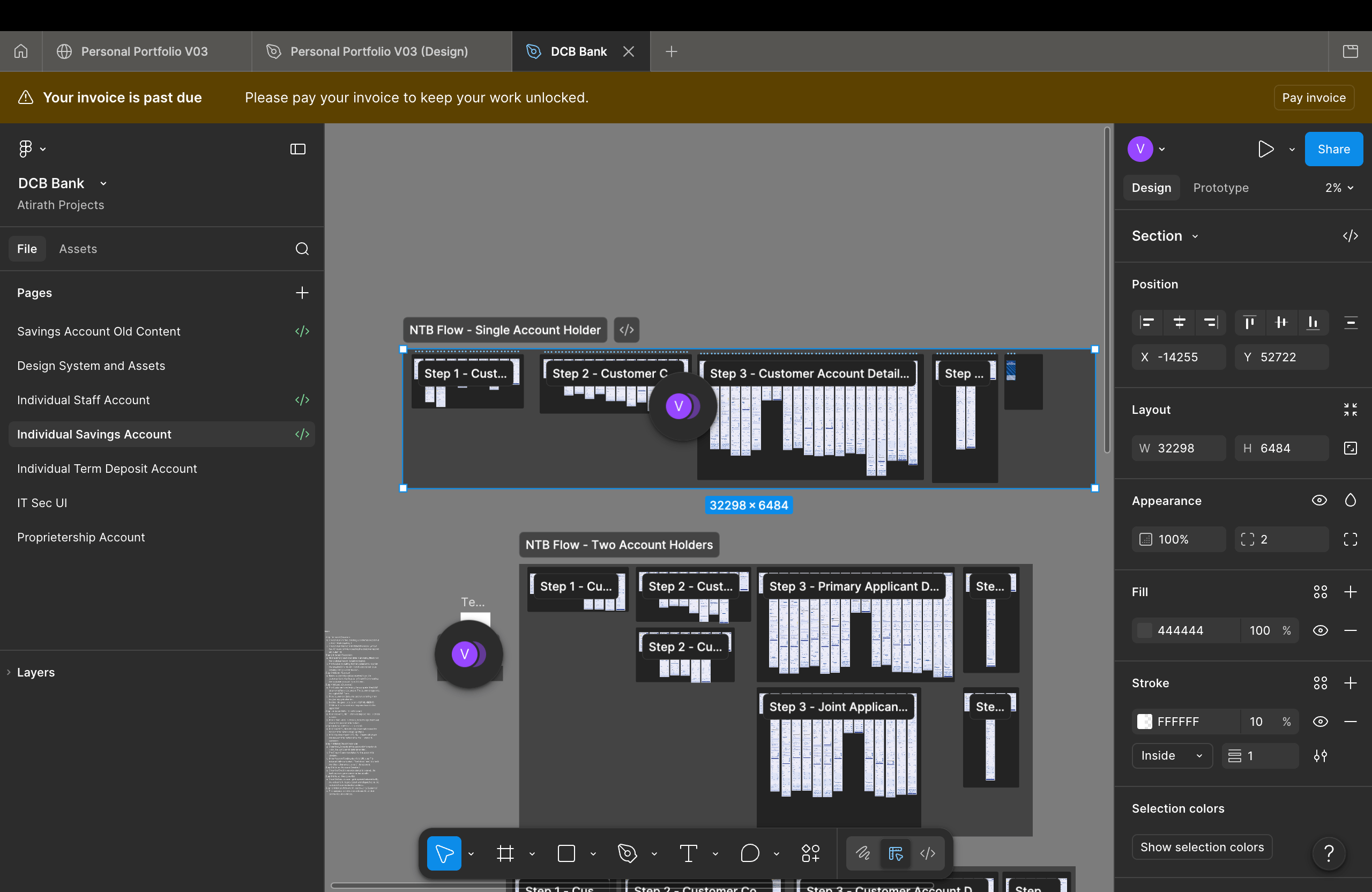
1 · Design in Figma
Obscured — design in active development and not yet public.
Every screen built to spec in Figma against the DCB brand system.
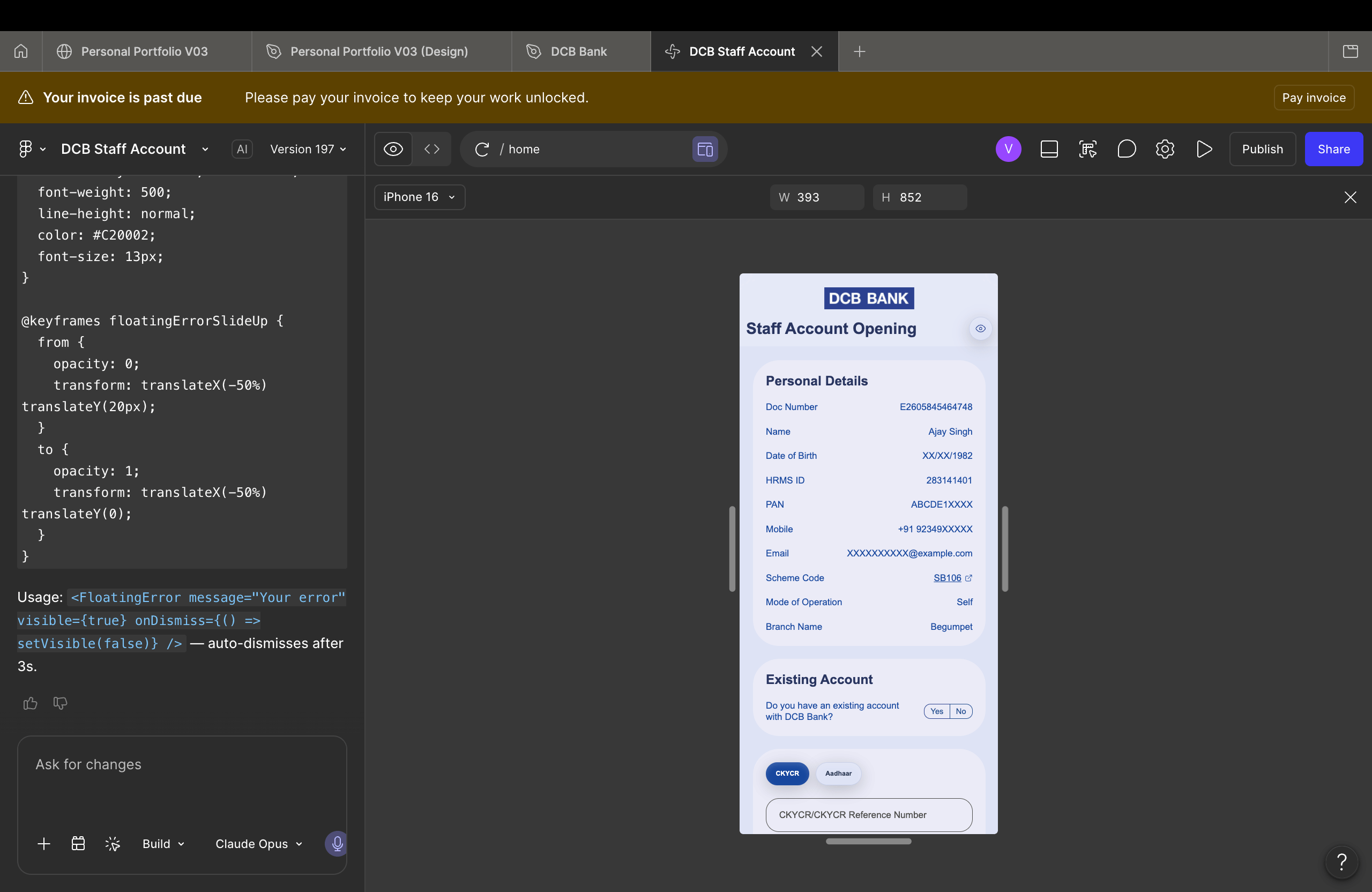
2 · Generate with Figma Make
Obscured — design in active development and not yet public.
Designs converted into working front-end code, collapsing the design-to-dev gap.
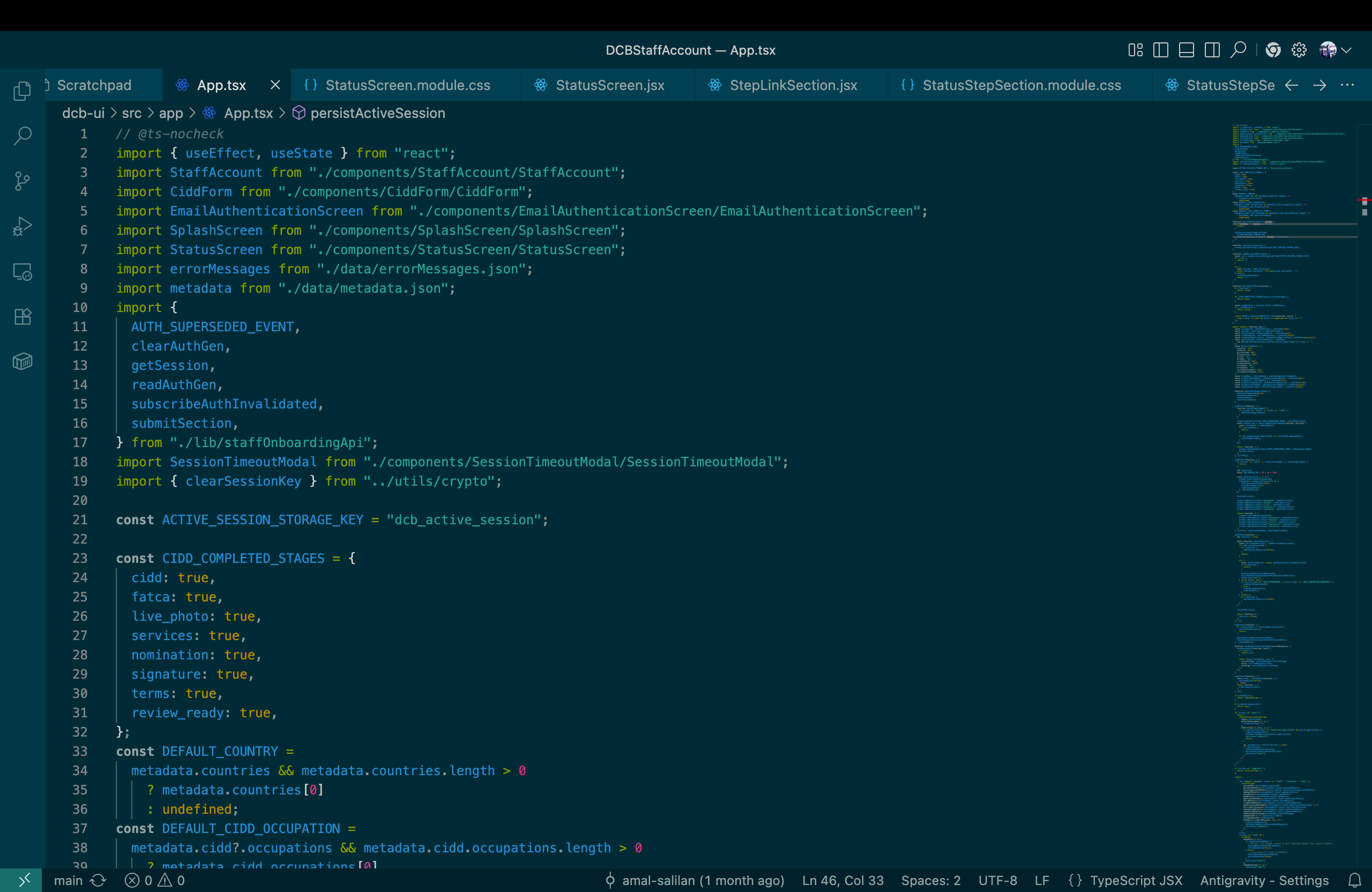
3 · Refine & ship
Obscured — design in active development and not yet public.
Hand-tuned into production-ready UI for the official DCB products.
Outcome & Learnings
01
POC → signed client
A two-and-a-half-month proof of concept convinced DCB’s CXO team — a PO was signed and DCB officially became our client.
02
From POC to a product suite
The first BRDs followed, kicking off DCB’s first wave of official AI onboarding products.
03
Owning requirements opened doors
End-to-end ownership of the POC earned me the architecture seat on the official build, not just the design one.
04
Designed for real scale
Rolling out through September, the platform is set to ease onboarding for roughly 70,000 customers across India.


AI-powered onboarding for one of Indian Banking’s most complex account types.
DCB CUBE 2.0 AI Platform
Role

Lead Requirements Gatherer · UX/UI Designer · Principal Front-End Developer
Company

Atirath Technologies × DCB Bank
Tools

Figma
FigJam
Figma Make
React
POC: 2.5 months · BRD signed: May 2026 · Releases through Sept 2026
DCB Bank Website

The Context
Opening a Trust account is one of the most complex onboarding journeys in Indian banking — layered across multiple Trust Acts, with dozens of document and KYC checks that change from case to case.
01
Relationship Managers with no prior trust experience were expected to open these accounts correctly.
02
A single executive stakeholder oversees 600–700 trust-account openings a day, nationwide.
03
Every account meant manually navigating regulation, gathering the right documents, and verifying each one’s validity.
04
The outcome: a slow, error-prone, expert-dependent process that simply did not scale.
The brief: prove that an LLM-driven chatbot could guide any RM through the entire journey — accurately, and without a specialist in the loop.
From Proof of Concept to Product
Proof of concept — Trust account journey
Ikee — RM sign-in
Customer dashboard
Ikee chatbot — guided journey
Official products — currently in development
Staff account — OTP verification
Obscured — design in active development and not yet public.
Customer records dashboard
Obscured — design in active development and not yet public.
Project Overview
CUBE 2.0 is an AI-powered onboarding platform built for DCB Bank. At its centre is Ikee, a conversational assistant that lets any relationship manager open complex accounts through a simple chat — not forms — while the system handles the heavy lifting behind the scenes.
What CUBE 2.0 does
Opens accounts through a guided conversation instead of dense forms.
Walks any RM through each step in plain language — no specialist required.
Reads and checks documents as they are collected, flagging what is missing or invalid.
Produces the bank’s completed application paperwork at the end of the journey.
What I own
Requirements — the single point of contact with DCB’s executive stakeholders.
UX / UI — every screen and the full chatbot interaction model.
Front-end — shipping the production UI, accelerated by code-gen automation.
Scope — the platform behind DCB’s first wave of AI onboarding products.
The Challenges
Four problems had to be solved at once for the concept to be credible to a bank.

Regulation overload
Multiple Trust Acts and case-by-case rules that no single RM could be expected to know.

Inexperienced operators
The product had to make a first-timer perform like a trust specialist.

Document validity
Every document had to be the correct one — and actually valid — before submission.

Built for scale
The journey had to hold up across roughly 70,000 customers nationwide.
Design Goals
01
Make complexity invisible
Hide the regulatory machinery and surface only the next simple step the RM needs to take.
02
Guide, never gate
Ikee leads the way and explains as it goes — it never blocks the RM with jargon or dead ends.
03
Status you can trust at a glance
Always show where the account stands and whether each document is valid, pending, or rejected.
04
True to the DCB brand
Every screen built to the DCB brand book — navy, yellow, Arial — so it feels unmistakably like the bank.
05
Paper-free by default
The entire journey runs end to end digitally, with zero physical forms.
One Platform, Many Account Types
CUBE 2.0 is built so the same conversational experience can open very different account types. The Trust journey proved the model; the platform is now being extended across DCB’s onboarding suite — each new account type plugging into the same intelligent core.
Chat-first onboarding
Smart document handling
Live validity status
Auto-generated paperwork
Ready for new account types
Products I’m Leading
The first three account types under the signed BRD — each one mine end to end across requirements, design, and front-end.
01
Individual Staff Account
Fast, guided onboarding for the bank’s own staff members.
Requirements
UX/UI
Front-End
02
Individual Savings Account
Resident individual savings onboarding, designed for everyday scale.
Requirements
UX/UI
Front-End
03
Proprietorship Account
Non-individual onboarding tailored to sole proprietors.
Requirements
UX/UI
Front-End
The Logic Engine
Before a single screen was designed, I mapped the entire trust-account decision logic — every branch, document gate, and validation path the assistant would follow. This map became the framework the LLM engine and the chatbot UI were both built on.
The full decision map at scale — too dense to read at a glance, which is exactly the point: it is the rigor the product is built on.
Obscured — design in active development and not yet public.
Architecture I Helped Shape
Owning the requirements end to end earned me a seat at the architecture table. After the BRD was signed, I helped draft the platform’s logical architecture — shown here only as a backdrop, kept deliberately illegible.
Obscured — design in active development and not yet public.
Visual Design System
Every surface is built to the DCB Bank brand book, so the product feels unmistakably like the bank from the first screen.
Colour
DCB Blue — #17479E
The bank’s primary navy. Anchors headers, structure, and brand presence.
DCB Yellow — #FFDD00
The signature accent. Reserved for action, focus, and highlights.
Neutral Grey — #6D6E71
Quiet supporting tone for body text, labels, and dividers.
Type
Arial is the DCB brand typeface — bold for headlines, regular for body, and narrow for fine print — used consistently across every product screen.
Design system
Obscured — design in active development and not yet public.
Mobile-first
Designed for the RM’s phone, where onboarding actually happens.
Clear hierarchy
One primary action per screen keeps an inexperienced RM on track.
Consistent system
Shared components and spacing across every account type.
From Design to Code with Figma Make
I don’t just design these products — I ship them. Using Figma Make, I automate front-end code generation straight from my designs, which is how I act as both lead product designer and principal front-end developer on this engagement.
1 · Design in Figma
Obscured — design in active development and not yet public.
Every screen built to spec in Figma against the DCB brand system.
2 · Generate with Figma Make
Obscured — design in active development and not yet public.
Designs converted into working front-end code, collapsing the design-to-dev gap.
3 · Refine & ship
Obscured — design in active development and not yet public.
Hand-tuned into production-ready UI for the official DCB products.
Outcome & Learnings
01
POC → signed client
A two-and-a-half-month proof of concept convinced DCB’s CXO team — a PO was signed and DCB officially became our client.
02
From POC to a product suite
The first BRDs followed, kicking off DCB’s first wave of official AI onboarding products.
03
Owning requirements opened doors
End-to-end ownership of the POC earned me the architecture seat on the official build, not just the design one.
04
Designed for real scale
Rolling out through September, the platform is set to ease onboarding for roughly 70,000 customers across India.


AI-powered onboarding for one of Indian Banking’s most complex account types.
DCB CUBE 2.0 AI Platform
Role

Lead Requirements Gatherer · UX/UI Designer · Principal Front-End Developer
Company

Atirath Technologies × DCB Bank
Tools

Figma
FigJam
Figma Make
React
POC: 2.5 months · BRD signed: May 2026 · Releases through Sept 2026
DCB Bank Website

The Context
Opening a Trust account is one of the most complex onboarding journeys in Indian banking — layered across multiple Trust Acts, with dozens of document and KYC checks that change from case to case.
01
Relationship Managers with no prior trust experience were expected to open these accounts correctly.
02
A single executive stakeholder oversees 600–700 trust-account openings a day, nationwide.
03
Every account meant manually navigating regulation, gathering the right documents, and verifying each one’s validity.
04
The outcome: a slow, error-prone, expert-dependent process that simply did not scale.
The brief: prove that an LLM-driven chatbot could guide any RM through the entire journey — accurately, and without a specialist in the loop.
From Proof of Concept to Product
Proof of concept — Trust account journey
Ikee — RM sign-in
Customer dashboard
Ikee chatbot — guided journey
Official products — currently in development
Staff account — OTP verification
Obscured — design in active development and not yet public.
Customer records dashboard
Obscured — design in active development and not yet public.
Project Overview
CUBE 2.0 is an AI-powered onboarding platform built for DCB Bank. At its centre is Ikee, a conversational assistant that lets any relationship manager open complex accounts through a simple chat — not forms — while the system handles the heavy lifting behind the scenes.
What CUBE 2.0 does
Opens accounts through a guided conversation instead of dense forms.
Walks any RM through each step in plain language — no specialist required.
Reads and checks documents as they are collected, flagging what is missing or invalid.
Produces the bank’s completed application paperwork at the end of the journey.
What I own
Requirements — the single point of contact with DCB’s executive stakeholders.
UX / UI — every screen and the full chatbot interaction model.
Front-end — shipping the production UI, accelerated by code-gen automation.
Scope — the platform behind DCB’s first wave of AI onboarding products.
The Challenges
Four problems had to be solved at once for the concept to be credible to a bank.

Regulation overload
Multiple Trust Acts and case-by-case rules that no single RM could be expected to know.

Inexperienced operators
The product had to make a first-timer perform like a trust specialist.

Document validity
Every document had to be the correct one — and actually valid — before submission.

Built for scale
The journey had to hold up across roughly 70,000 customers nationwide.
Design Goals
01
Make complexity invisible
Hide the regulatory machinery and surface only the next simple step the RM needs to take.
02
Guide, never gate
Ikee leads the way and explains as it goes — it never blocks the RM with jargon or dead ends.
03
Status you can trust at a glance
Always show where the account stands and whether each document is valid, pending, or rejected.
04
True to the DCB brand
Every screen built to the DCB brand book — navy, yellow, Arial — so it feels unmistakably like the bank.
05
Paper-free by default
The entire journey runs end to end digitally, with zero physical forms.
One Platform, Many Account Types
CUBE 2.0 is built so the same conversational experience can open very different account types. The Trust journey proved the model; the platform is now being extended across DCB’s onboarding suite — each new account type plugging into the same intelligent core.
Chat-first onboarding
Smart document handling
Live validity status
Auto-generated paperwork
Ready for new account types
Products I’m Leading
The first three account types under the signed BRD — each one mine end to end across requirements, design, and front-end.
01
Individual Staff Account
Fast, guided onboarding for the bank’s own staff members.
Requirements
UX/UI
Front-End
02
Individual Savings Account
Resident individual savings onboarding, designed for everyday scale.
Requirements
UX/UI
Front-End
03
Proprietorship Account
Non-individual onboarding tailored to sole proprietors.
Requirements
UX/UI
Front-End
The Logic Engine
Before a single screen was designed, I mapped the entire trust-account decision logic — every branch, document gate, and validation path the assistant would follow. This map became the framework the LLM engine and the chatbot UI were both built on.
The full decision map at scale — too dense to read at a glance, which is exactly the point: it is the rigor the product is built on.
Obscured — design in active development and not yet public.
Architecture I Helped Shape
Owning the requirements end to end earned me a seat at the architecture table. After the BRD was signed, I helped draft the platform’s logical architecture — shown here only as a backdrop, kept deliberately illegible.
Obscured — design in active development and not yet public.
Visual Design System
Every surface is built to the DCB Bank brand book, so the product feels unmistakably like the bank from the first screen.
Colour
DCB Blue — #17479E
The bank’s primary navy. Anchors headers, structure, and brand presence.
DCB Yellow — #FFDD00
The signature accent. Reserved for action, focus, and highlights.
Neutral Grey — #6D6E71
Quiet supporting tone for body text, labels, and dividers.
Type
Arial is the DCB brand typeface — bold for headlines, regular for body, and narrow for fine print — used consistently across every product screen.
Design system
Obscured — design in active development and not yet public.
Mobile-first
Designed for the RM’s phone, where onboarding actually happens.
Clear hierarchy
One primary action per screen keeps an inexperienced RM on track.
Consistent system
Shared components and spacing across every account type.
From Design to Code with Figma Make
I don’t just design these products — I ship them. Using Figma Make, I automate front-end code generation straight from my designs, which is how I act as both lead product designer and principal front-end developer on this engagement.
1 · Design in Figma
Obscured — design in active development and not yet public.
Every screen built to spec in Figma against the DCB brand system.
2 · Generate with Figma Make
Obscured — design in active development and not yet public.
Designs converted into working front-end code, collapsing the design-to-dev gap.
3 · Refine & ship
Obscured — design in active development and not yet public.
Hand-tuned into production-ready UI for the official DCB products.
Outcome & Learnings
01
POC → signed client
A two-and-a-half-month proof of concept convinced DCB’s CXO team — a PO was signed and DCB officially became our client.
02
From POC to a product suite
The first BRDs followed, kicking off DCB’s first wave of official AI onboarding products.
03
Owning requirements opened doors
End-to-end ownership of the POC earned me the architecture seat on the official build, not just the design one.
04
Designed for real scale
Rolling out through September, the platform is set to ease onboarding for roughly 70,000 customers across India.